If your completed test is unsuccessful and qualifies for a replacement under the PocDoc Results Guarantee, the PocDoc app will automatically offer you a replacement.
If you do not see the replacement offer immediately, tap the bell icon on the home screen to view any notifications relating to your test, and follow the on screen steps to order your replacement, as illustrated in the image below.
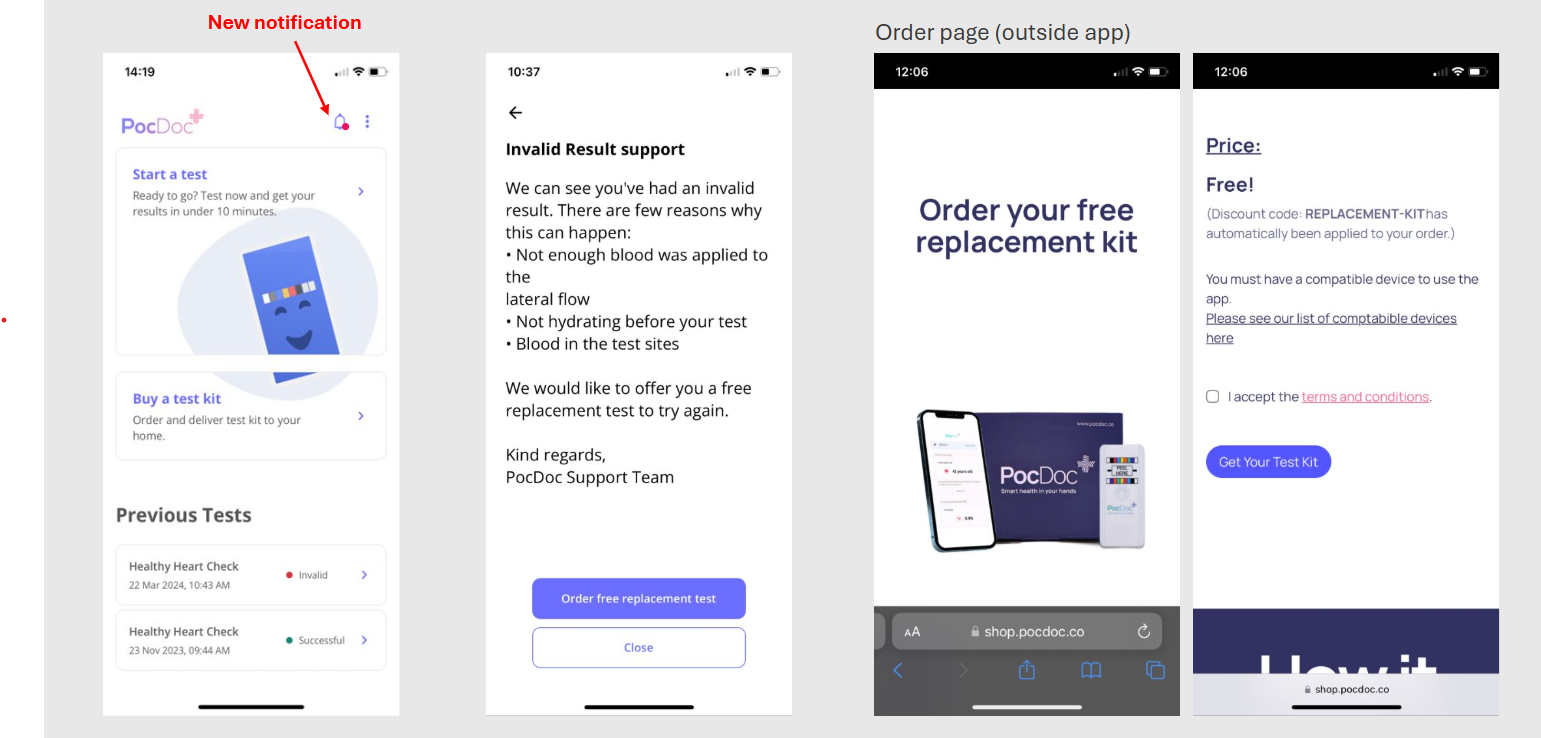
Please view the video attached below for a step-by-step walkthrough of this process.
Important: replacement tests are only offered automatically when a test has been completed and the app records an unsuccessful result. If you experienced a problem before completing the test, such as an issue with the lancet, transfer pipette, or another component of the kit, please contact our help desk here with the following information:
- The email address used to set up your PocDoc account
- The name of the organisation that supplied your test kit
- A brief description of what has gone wrong
If you have any further questions please contact us here and we will be happy to help.
Was this article helpful?
That’s Great!
Thank you for your feedback
Sorry! We couldn't be helpful
Thank you for your feedback
Feedback sent
We appreciate your effort and will try to fix the article