When you create a PocDoc account, you set your password as part of the sign-up process.
Steps
- 1.Open the PocDoc app and tap Sign up.

- Enter your first name, last name, and email address, then choose a password and confirm it. Tick the box to agree to PocDoc's Privacy Policy, then tap Create account.
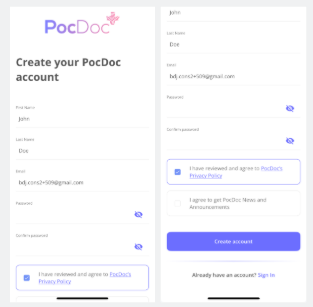
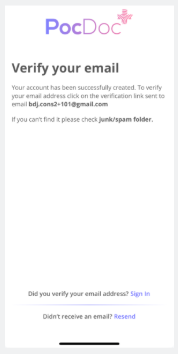
- You'll see a Verify your email screen. Check your inbox for a verification email from PocDoc and click the link inside.
- Once verified, you can sign in using your email address and the password you just created.
Password requirements
- At least 8 characters
- At least one uppercase letter
- At least one lowercase letter
- At least one number
- At least one special character (e.g. !, @, #)
Having trouble?
- Didn't receive a verification email? Check your junk/spam folder. The verify your email screen also has a Resend option if needed.
- Apple auto-filling the wrong password? See Why is Apple auto-filling my PocDoc password?.
- Already have an account and need to reset your password? See Forgotten your password?.
Was this article helpful?
That’s Great!
Thank you for your feedback
Sorry! We couldn't be helpful
Thank you for your feedback
Feedback sent
We appreciate your effort and will try to fix the article