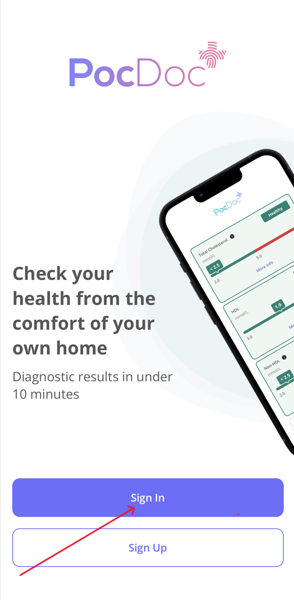
If you can't remember your password, you can reset it from the PocDoc app. Open the PocDoc app

Click on the blue button - Sign in
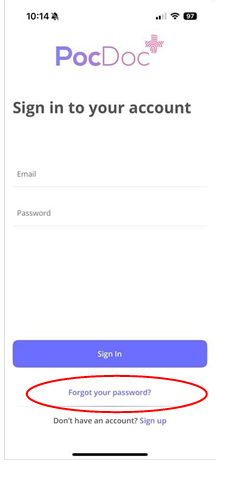
Click on the writing 'forgotten password'.
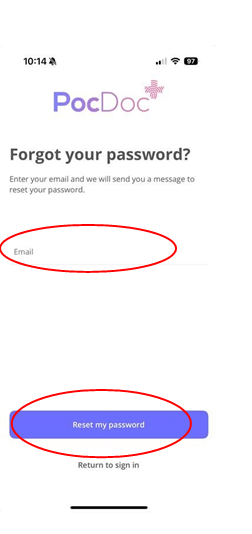
Enter your email and press Reset my password:
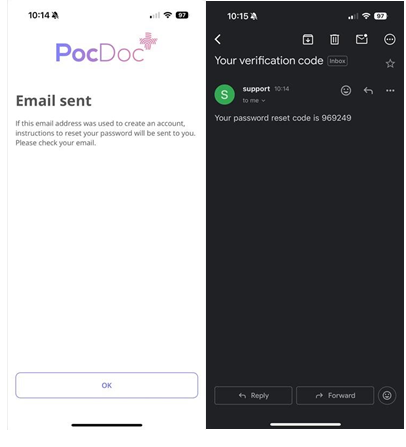
Click OK. You will receive you verification code in an email. Open the email and make a note of the 6-digit reset code.
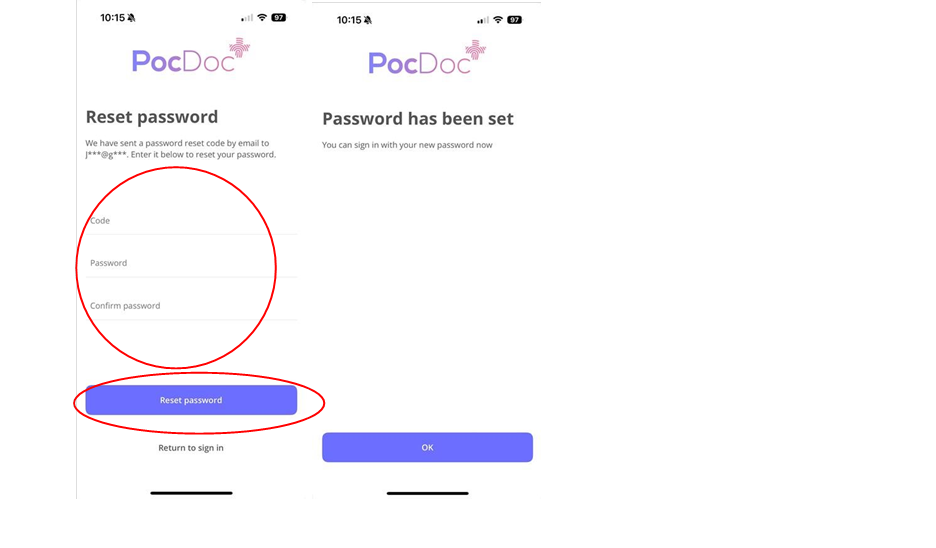
 Back in the app, enter the reset code, choose a new password, confirm it, and tap Reset password.
We recommend copying and pasting the code directly from the email to avoid errors — if typing it manually, make sure there are no spaces before or after the code.
Note: If you do not receive a reset code, check your junk or spam folder. If it is still not there, the email address entered may not be registered with PocDoc. If you have forgotten which email address you used.
Please note that if you have any further questions contact us by clicking here we are happy to help.
Was this article helpful?
That’s Great!
Thank you for your feedback
Sorry! We couldn't be helpful
Thank you for your feedback
Feedback sent
We appreciate your effort and will try to fix the article